How to Tell What Data Your Apps Are Taking (Using ChatGPT or Claude)
A practical guide to app privacy labels, the iPhone App Privacy Report, data requests, and ChatGPT/Claude prompts that turn privacy policies into plain English.
Key takeaways
- Read the App Store privacy label first, starting with "Data Used to Track You", but remember developers self-report it.
- Turn on App Privacy Report (Settings > Privacy & Security) to see what apps access and which domains they contact.
- Laws like California's CCPA and the EU/UK GDPR let you ask companies for a copy of your data.
- Paste the privacy policy, never your personal data, into ChatGPT or Claude, ask for exact quotes, then search the original for every quote.
- Our check of Strava, MyFitnessPal and Google Health found public-by-default profiles, ad-related "sharing" and a possible label-versus-policy mismatch.
Privacy policies are written by lawyers, for lawyers, and seemingly to be read by no one. The average one is a long scroll of "partners," "affiliates" and "legitimate interests," like a terms-and-conditions escape room with no hints.
The good news is that you now have tools that do most of the decoding: the platforms' own privacy labels, your iPhone's built-in App Privacy Report, legal data-access rights, and AI chatbots that can turn 8,000 words of legalese into a checklist. Here's how to use all four without being fooled by any of them.
Step 1: Read the privacy label before you download
Start with the label on the store listing: it's the developer's own summary of what the app collects, shown before you install anything.
App Store "privacy nutrition labels"
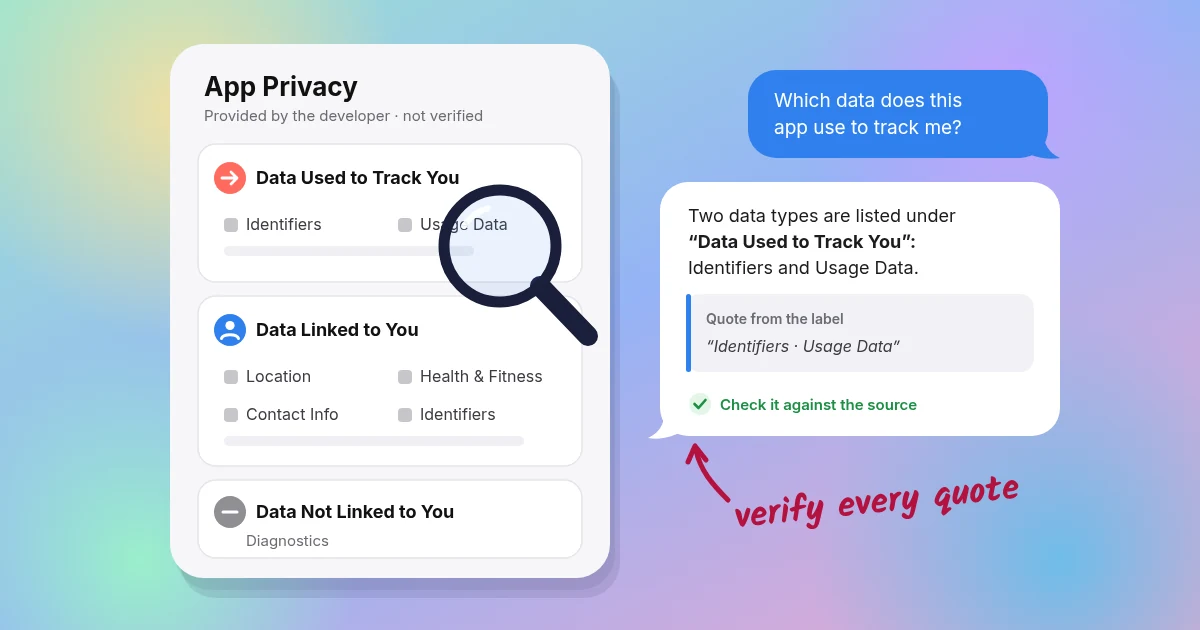
Every App Store listing has an App Privacy section, split into up to three groups (Apple Support; Apple Developer):
- Data Used to Track You: data linked with other companies' apps, websites or data brokers for advertising or measurement. This is the one to read first.
- Data Linked to You: data tied to your identity, such as your account, device or email.
- Data Not Linked to You: data collected but not tied to your identity.
There's an important catch: the labels are self-reported by developers and not verified by Apple (Apple Support). Treat them as a claim to check, not proof.
Google Play "Data safety"
Google Play's equivalent is the Data safety section. Its definitions have some gaps. Data processed only on your device isn't counted as "collected," and transfers to a developer's service providers don't count as "shared" (Google Play Help).
When Mozilla reviewed 40 popular apps in 2023, it found discrepancies between the Data safety forms and privacy policies in nearly 80% of them (Mozilla Foundation).
Step 2: Check what apps actually do on your iPhone
Labels describe what an app says it does. Your iPhone can show you some of what it actually does.
Turn on App Privacy Report
- Open Settings > Privacy & Security > App Privacy Report (iOS 15.2 or later).
- Turn it on, then check back after a few days of normal use.
It shows which apps accessed your location, photos, camera, microphone and contacts over the past 7 days, and which internet domains each app contacted. The report is stored on your device, and turning it off clears it (Apple Support).
Apple notes that an app accessing data isn't the same as the developer collecting it (same source). A photo editor can open your photos without uploading them. Still, a flashlight app contacting a dozen ad domains tells you something.
Audit location permissions
Go to Settings > Privacy & Security > Location Services. For each app, choose Never, Ask Next Time, While Using the App or Always, and decide whether it gets Precise Location (Apple Support). A weather app rarely needs precise location. A step counter needs motion access, not your contacts. (Why "Always" location became so hard to grant is a story of its own.)
Step 3: Ask companies for a copy of your data
You often have a legal right to see your data:
- California (CCPA/CPRA, the state's consumer privacy law): you can ask to know, delete and correct your data, and opt out of its sale or sharing (California Privacy Protection Agency FAQ).
- Businesses must confirm receipt within 10 business days and respond within 45 calendar days, extendable to 90 (same source).
- Browsers that send a Global Privacy Control signal, a setting that tells sites you don't want your data sold or shared, count as an opt-out (same source).
- Californians can also use DROP, a state tool for asking registered data brokers to delete your data, with brokers processing requests from August 2026 (CalPrivacy DROP).
- EU/UK (GDPR, the General Data Protection Regulation): a subject access request generally must be answered within one month, extendable by up to two more months for complex requests (UK ICO).
Most apps have a "Download your data" option in settings or a privacy portal. Use it, then see Step 4 on what not to paste into a chatbot.
Step 4: Let ChatGPT or Claude translate the legalese
A chatbot can turn a long privacy policy into a readable checklist, as long as you feed it the right text and check its work.
Before you paste: three rules
- Paste the policy, not your personal data. Privacy policies and App Store labels are public documents. Your data export isn't. Review that yourself, or strip identifying details first.
- Check the chatbot's own settings. In ChatGPT, you can turn off "Improve the model for everyone" under Data Controls, or use Temporary Chat (OpenAI; OpenAI Temporary Chat). Claude has a "Help improve Claude" setting, and Anthropic's retention period depends on that choice (Anthropic; Anthropic Privacy Center). Yes, it's a little ironic.
- Verify everything. Chatbots can produce incorrect or made-up answers that sound confident; OpenAI's own help center calls this "hallucination" and advises verifying important information (OpenAI). That's why every prompt below asks for exact quotes you can search for in the original.
Prompt templates
Copy the full privacy policy text (not just the link, since the bot may not be able to fetch it), then paste one of these.
Prompt 1: Plain-English summary
You are a careful privacy analyst. Using ONLY the privacy policy text below, answer:
1. What personal data is collected (list categories, e.g., location, health, contacts, device IDs)?
2. Is precise location collected? When?
3. Is data sold, "shared" for targeted advertising, or licensed (even if de-identified)?
4. Who receives data (advertisers, analytics, partners, affiliates, buyers in a merger)?
5. How long is data kept, and how do I delete it?
6. How do I opt out of sale/sharing/ads?
For every answer, quote the exact sentence from the policy. If the policy doesn't say, write "Not stated." Do not use outside knowledge.

[PASTE POLICY TEXT]
Prompt 2: Label vs. policy cross-check
Below are (A) an app's App Store privacy label and (B) its privacy policy.
List any data types or uses that appear in one but not the other, and any wording that seems to conflict (e.g., "we don't sell data" vs. ad-related sharing). Quote both sources for each item. Flag uncertainty instead of guessing.

(A) [PASTE LABEL TEXT]
(B) [PASTE POLICY TEXT]
Prompt 3: Opt-out checklist
From the policy below, make a step-by-step checklist of every privacy control or opt-out it mentions (in-app settings, web links, email addresses, Global Privacy Control, account deletion). Include the exact setting names as written. Quote the source sentence for each step.

[PASTE POLICY TEXT]
Prompt 4: Red-flag scan
Scan this policy for: data sale or "sharing" under US state privacy laws, third-party SDKs/advertising cookies, use of data for AI training, public-by-default settings, data transfer in a merger, and vague retention ("as long as necessary"). Rate each as Present / Not present / Unclear, with quotes.

[PASTE POLICY TEXT]
Then do the important part: search the original document (Cmd+F) for each quoted sentence. If a quote isn't there, the bot made it up.
Review: we ran this checklist on three popular fitness apps
What we found: public-by-default profiles, ad-related "sharing" that may count as a sale under privacy law, and a possible label-versus-policy mismatch worth asking about.
How we checked
We applied the questions in Prompt 1 and Prompt 4 to the published privacy policies and App Store labels of Strava, MyFitnessPal and Google Health (formerly the Fitbit app). We checked every finding by reading the source documents line by line, which is exactly the verification step you should do with any AI answer. The labels were checked on Oct 1, 2026. Policies and labels change, so check the current versions.
Strava
- Label: lists Purchases and Identifiers under "Data Used to Track You," and lists User ID and Product Interaction as linked data used for third-party advertising. It also lists Health and Fitness data under "Developer's Advertising or Marketing" and "Analytics" (App Store).
- Public by default: "If you are 18 years or older, certain information, including your profile and your activities, is set by default to be viewable by 'Everyone.'" That includes the public and search engines (Strava Privacy Policy).
- Ads and sharing: Strava uses third parties and tracking technologies for targeted advertising. You can opt out via "Do Not Share My Personal Information" or the in-app "Personal Information Sharing" setting, and it honors Global Privacy Control (same source).
- De-identified data: it may license de-identified or aggregated data, for example via Strava Metro (same source).
- Health data: health data from integrations, such as heart rate, won't be sold or used for advertising (same source). That sits a little awkwardly next to the label's "Developer's Advertising or Marketing" entry for Health and Fitness. It may refer to Strava's own activity data rather than integration data, but it's exactly the kind of mismatch Prompt 2 is designed to catch, and a fair question to put to the company.
- AI: it uses personal information, potentially including health and location data depending on your settings, for AI features (same source).
MyFitnessPal
- Label: lists Identifiers and Usage Data under "Data Used to Track You" (App Store).
- "Sale," with an asterisk: "While MyFitnessPal does not expressly 'sell' information to others, certain uses of… Targeted Advertising Cookies… may constitute 'sales' or 'sharing'… under applicable privacy laws" (MyFitnessPal Privacy Policy).
- Location: "MyFitnessPal does not collect specific geolocation information" (same source). Credit where due.
- Health data: data from Apple HealthKit and Health Connect isn't used for advertising (same source).
- Retention: kept "as long as necessary," which is a common but vague standard (same source).
Google Health (formerly Fitbit)
- Label: has no "Data Used to Track You" section, but lists extensive linked data, including health, fitness and precise location. Some categories are listed for the developer's own advertising or marketing (App Store).
- Account: after May 19, 2026, Fitbit accounts can no longer be used, so users need to move to a Google Account, where Google's Privacy Policy applies (Google Health privacy FAQ).
- Location: collects precise location for select features if you grant access (same source).
- Ads: "Google committed to not use Fitbit users' health and wellness data for Google Ads" (same source). The legacy Fitbit policy states, "We never sell the personal information of our users" (Fitbit Privacy Policy).
How Kinetic compares
| Strava | MyFitnessPal | Google Health | Kinetic | |
|---|---|---|---|---|
| Account required | Yes | Yes | Yes (Google Account) | No |
| "Data Used to Track You" on App Store label | Yes | Yes | No section listed | Not reproduced here (see note below) |
| Ads or ad partners | Yes (opt-out available) | Yes (opt-out available) | Some data used for developer's own marketing; commitment not to use Fitbit health data for Google Ads | No ads |
| Label lists data used for "Analytics" | Yes (incl. health, fitness, precise location) | Yes (identifiers, usage, diagnostics) | Yes (incl. health, fitness, precise location) | No analytics |
| Where data lives | Company servers | Company servers | Google servers | Your iPhone + your iCloud |
| Public by default | Profile and activities, for adults | Not stated in policy | Not stated in policy | No profile; nothing to publish |
Kinetic's column reflects Kinetic's stated practices on kinetic.site. We haven't reproduced Kinetic's own App Store label in this table, so check it on the App Store listing the same way you would for any other app. Competitor columns summarize the sources above. "Yes" means the document describes the practice, not that it's misused.
To be fair, these apps offer social features, coaching and food databases that need servers. Kinetic makes a different trade: it logs your steps, places, walks, drives, rides, workouts and sleep automatically, reads Apple Health without writing to it, and keeps everything on your phone. We can't sell what we never see.
Kinetic is free for the first year, then $19.99/year. And hold us to the same checklist you'd use for any other app.
Sources
- Apple Support, App privacy labels on the App Store
- Apple Developer, App privacy details
- Google Play Help, Data safety section
- Mozilla Foundation, "See No Evil" Data safety study (2023)
- Apple Support, About App Privacy Report
- Apple Support, About privacy and Location Services
- California Privacy Protection Agency, FAQ
- CalPrivacy, Delete Request and Opt-out Platform (DROP)
- UK ICO, What to expect after making a subject access request
- OpenAI Help, Data Controls FAQ
- OpenAI Help, Temporary Chat
- OpenAI Help, Does ChatGPT tell the truth?
- Anthropic, Updates to consumer terms and privacy policy
- Anthropic Privacy Center, How long do you store my data?
- App Store, Strava
- Strava Privacy Policy (effective Jan 1, 2026)
- App Store, MyFitnessPal
- MyFitnessPal Privacy Policy (effective Mar 18, 2025)
- App Store, Google Health (Fitbit)
- Google, Google Health privacy FAQ (updated May 19, 2026)
- Fitbit Privacy Policy (legacy accounts)
- Kinetic