Fitness Tracker Apps Used to Be Automatic. What Changed?
Moves died, Google Timeline went on-device and iOS stopped handing out 'Always' location. Here's what happened to automatic tracker apps, and what works now.
Key takeaways
- Moves wasn't killed by a permission prompt: Facebook bought it in 2014 and shut it down in 2018.
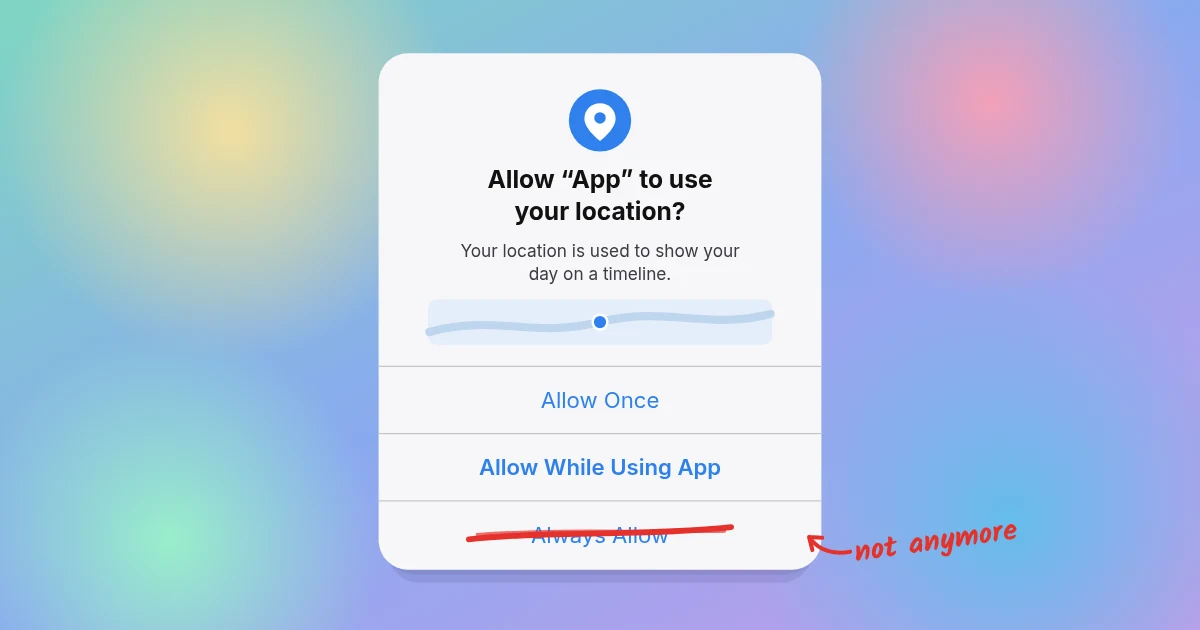
- iOS turned "Always" location into a two-step choice. Since iOS 13 it's missing from the first prompt, and reminders show where apps have used your location. Android made similar changes.
- Google moved Timeline onto your phone, a strong hint about where the industry is heading.
- Data-broker scandals and FTC cases gave people good reasons to say no, often because of SDKs hidden inside ordinary apps.
- Automatic tracking still works. Apps just have to earn the permission and stop being greedy with battery and data.
Remember when your phone just knew? You'd walk to coffee, take the train, wander around a museum, and by evening an app like Moves had drawn your whole day as a neat little timeline. You didn't start anything or press anything, and nobody asked you to "log a workout."
Then, one by one, those apps vanished, got worse, or started nagging. The popular explanation is that people got spooked about privacy and stopped tapping "Always Allow."
That's only part of the story. The short answer: the platforms changed the menu first. Apple and Google redesigned location permissions so "Always" takes more steps to grant, a run of data-broker scandals gave people good reasons to say no, and the most famous automatic tracker was bought and switched off. Users did change their behavior, but mostly because the choices in front of them changed.
What happened to Moves, the original automatic tracker?
Short version: Facebook bought it, then switched it off four years later. Moves, made by the Finnish startup ProtoGeo, was the poster child of automatic logging. It recorded walking, cycling and running, and the places you stopped, all without manual input. Facebook acquired it in April 2014 (TechCrunch).
On the day of the deal, Moves promised there were "no plans to change that or commingle data with Facebook." Eleven days later, its privacy policy was updated to allow sharing personally identifying information with "affiliates… including but not limited to Facebook" (The Guardian).
In 2018 Facebook shut Moves down, citing low usage, and said user data would be deleted within 90 days (Meta; BBC).
So Moves wasn't killed by a permission dialog. It was killed the old-fashioned way: it got acquired, became an afterthought and was switched off. Years later, reviewers of other timeline apps still mention Moves as the reason they went looking (App Store reviews, Arc Timeline).
Why did Google move Timeline onto your phone?
Because even a company built on data decided your location history was safer kept on your phone. That's a strong signal about where the industry is heading.
Google's Location History, later called Timeline, was the other giant. In 2018 the Associated Press found that some Google services stored location data even after users paused Location History (AP). That reporting fed into a $391.5 million settlement with 40 US states in 2022 (AP).
In December 2023, Google announced that Timeline would be stored on the user's device instead of its servers, with an option for encrypted cloud backups. The default auto-delete for new users dropped from 18 months to 3 months (Google). The web version of Timeline went away as part of the transition (9to5Google).
On-device storage has a catch, though. In March 2025, a technical issue deleted some users' Timeline data, and people without a backup couldn't get it back (The Verge).
How iOS rewired location permissions, one version at a time
Each iOS release since 2017 has made background location a more deliberate choice. Here's the short version; the details and sources follow.
| iOS version | Year | What changed |
|---|---|---|
| iOS 11 | 2017 | Apps asking for "Always" must also offer "While Using the App" |
| iOS 13 | 2019 | "Always" disappears from the first prompt; periodic reminders (sometimes with a map) show where apps used your location in the background |
| iOS 14 | 2020 | The Precise Location toggle lets you share only an approximate area |
| iOS 14.5 | 2021 | App Tracking Transparency (about cross-app ad tracking, not location) |
iOS 11 (2017): "While Using" became mandatory
Before iOS 11, an app could ask for "Always" location and offer you only two choices: yes or no. From iOS 11, any app requesting Always access also had to offer "While Using the App," and Apple encouraged developers to ask for the smaller permission first (Macworld; MacRumors). The blue status bar indicator also expanded to show more background location use (Kuba Suder's developer write-up).
iOS 13 (2019): "Always" disappears from the first prompt
iOS 13 was the big one. The first location prompt now offers Allow Once and Allow While Using App, and "Always" isn't on it. If an app asks for Always and you pick "While Using," iOS gives it provisional Always access. Later, when the app actually tries to use location in the background, iOS asks you again whether to keep it "While Using" or change to "Always Allow" (Apple Developer docs; WWDC19 session 705).
iOS 13 also added periodic reminders. If an app has been using your location in the background, your iPhone will show you, sometimes on a map, where it has been tracking you and ask whether to continue (Apple Support; Apple Location Services white paper).
For users this was great: a map of everywhere an app has seen you is persuasive. For apps that legitimately needed background location, it was a speed bump. Tile, the item-tracker company, told a US House antitrust subcommittee in January 2020 that iOS 13 made Always Allow harder to grant, and pointed out that Apple's own Find My app competed with it (Tile testimony, PDF; MacRumors).
iOS 14 (2020): approximate location
iOS 14 added the Precise Location toggle, which lets you share only your approximate area with an app (WWDC20 session 10660; Apple Developer docs). That's perfect for a weather app and fatal for an app trying to work out which café you sat in.
iOS 14.5 (2021): App Tracking Transparency
App Tracking Transparency (ATT) often gets lumped in here, but it's a different thing. ATT requires apps to ask before tracking you across other companies' apps and websites for advertising (Apple Newsroom; Apple Developer). It isn't a location permission.
Still, early analytics data suggested most people said no when asked: Flurry estimated US opt-in at about 4% in the first weeks (AppleInsider). Once people were given a clear choice about being followed around, most of them said no thanks.
Did Android change location permissions too?
Yes, and Google wasn't far behind. Android 10 split "Allow all the time" from "Allow only while using the app," and Google said that more than half of users chose "while in use" (Android Developers Blog). In 2020 Google Play also began requiring developers to justify background location access before approval (same source). From Android 11, the in-app prompt no longer includes an "all the time" button, so users have to go to Settings to grant it (Android Developers).
So did people really stop choosing "Always Allow"?
Some data points suggest yes, though none of them is a clean, industry-wide number:
- Location Sciences, an ad-industry verification firm, reported a 68% drop in background location data after iOS 13 launched. That analysis covered more than 2 billion location events from a single UK app publisher over roughly five weeks in 2019 (MediaPost; iClarified).
- The CEO of location-marketing company Teemo told reporters that background opt-in rates were often below 50%, compared with near 100% a few years earlier, when many users didn't realize they had a choice (via Daring Fireball, summarizing Digiday/Fast Company).
- Google's Android 10 figure: over half of users picked "while in use" (Android Developers Blog).
Notice who measured most of this: ad-tech companies, whose business depended on that data. We couldn't find a published, independent statistic for what share of iPhone users grant Always location today. Anyone quoting one exact number should show their working.
Which scandals made people wary of location tracking?
A string of them, and most involved location data quietly ending up somewhere users never expected: on a public map, with data brokers, or with military contractors.
- Strava's heatmap (2018). A global map of public workouts revealed the outlines of military bases and patrol routes (The Guardian; BBC). In 2024, Le Monde reported that public Strava profiles of bodyguards could reveal the movements of world leaders (AP).
- Muslim Pro (2020). Motherboard reported that location data from the prayer app reached X-Mode, a broker whose data went to US military contractors. Muslim Pro ended the partnership and said it had not shared personally identifiable data with the military (Vice; Muslim Pro statement).
- X-Mode/Outlogic (2024). The FTC banned the company from selling sensitive location data, saying its raw data wasn't anonymized and could be tied to individuals (FTC).
- InMarket (2024). The FTC said the company sorted people into nearly 2,000 audience segments, with labels like "Christian church goers" and "wealthy and not healthy" (FTC).
- Gravy Analytics/Venntel and Mobilewalla (2024). The FTC alleged the companies sold data that revealed visits to sensitive places such as military sites, churches and health clinics (FTC, Gravy; FTC, Mobilewalla).
- Kochava (2022–2026). Sued by the FTC in 2022 over data that could track people to reproductive health clinics and places of worship. In May 2026 it agreed to a proposed order banning the sale of sensitive location data without consent (FTC 2022; FTC 2026).
The common thread is that location data often flowed out through SDKs buried inside ordinary apps. (An SDK, or software development kit, is a ready-made code library, such as an ad or analytics tool, that developers drop into their apps.) Your step counter didn't need to be evil for your data to end up somewhere weird. It just needed to include the wrong ad library.
What actually changed (and why automatic tracking isn't dead)
Putting it together:
- Platforms changed the defaults. "Always" went from a one-tap choice to a two-step, reminder-laden process.
- Users got better information. Reminder maps and privacy labels made background tracking visible.
- Trust eroded, thanks to broker scandals and acquisitions like Moves.
- Some big players pulled back, with Google moving Timeline onto the device.
Automatic tracking didn't die, though. Apple still gives developers the building blocks:
- Motion activity detection that classifies walking, running, cycling and driving on the device (CMMotionActivity).
- A pedometer (CMPedometer).
- Battery-friendly location services, like visit monitoring and significant-change updates, that can wake an app when something actually happens (visit monitoring; significant-change).
Apps like Arc Timeline and Life Cycle still do automatic logging today (Arc; Life Cycle).
What changed is the bargain. If an app wants to watch your day, it has to earn that trust and stop being greedy with battery and data.
How Kinetic does automatic logging without hoarding your data
Kinetic was built for the post-Moves world. It logs your steps, places (named using Apple Maps), walks, drives, rides, workouts and sleep, then draws your day as a timeline with summary bubbles. You don't start or stop anything.
What it doesn't do is just as important:
- No account. There's nothing to sign up for.
- No servers. Your data is saved on your iPhone and backed up to your own iCloud.
- No ads, no analytics. There's no SDK riding along to resell your commute.
- Read-only Apple Health. Kinetic reads sleep, workouts and heart rate, and never writes to Health.
- Battery manners. Background location pauses when you settle somewhere and switches off in Low Power Mode.
We like to put it simply: we can't sell what we never see.
Kinetic is free for the first year, then $19.99/year. It's a nice deal for a tracker that keeps its eyes on your steps and off your business.
Whatever tracker you pick, Kinetic included, don't take its word for it. Our guide to checking what data your apps collect shows how to read privacy labels, turn on the iPhone's App Privacy Report and get ChatGPT or Claude to decode a privacy policy.
Sources
- TechCrunch, "Facebook Acquires Activity Tracking App Moves" (2014)
- The Guardian, Moves privacy policy change (2014)
- Meta Newsroom, "Hello tbh, moving on" (2018)
- BBC, Facebook shuts Moves (2018)
- AP, Google tracks location even when told not to (2018)
- AP, Google $391.5M location settlement (2022)
- Google, Updates to Location History (Dec 2023)
- 9to5Google, on-device Timeline (2024)
- The Verge, Timeline data deleted (2025)
- Macworld, iOS 11 location changes
- MacRumors, iOS 11 "While Using" requirement
- Kuba Suder, Changes to location tracking in iOS 11
- Apple Developer, requestAlwaysAuthorization()
- Apple WWDC19 Session 705, What's New in Core Location
- Apple Support, About privacy and Location Services
- Apple, Location Services Privacy Overview (Nov 2019)
- Tile testimony, House Judiciary antitrust subcommittee (Jan 2020)
- MacRumors, Tile testimony coverage
- Apple WWDC20 Session 10660, What's new in location
- Apple Developer, accuracyAuthorization
- Apple Newsroom, iOS 14.5 (ATT)
- Apple Developer, User Privacy and Data Use
- AppleInsider, Flurry ATT opt-in data (2021)
- Android Developers Blog, Safer location access (2020)
- Android Developers, Android 11 location updates
- MediaPost, Location Sciences iOS 13 data
- iClarified, iOS 13 background location drop chart
- Daring Fireball, link to Fast Company on location opt-ins (2020)
- The Guardian, Strava heatmap and military bases (2018)
- BBC, Strava heatmap (2018)
- AP, Strava and leaders' bodyguards (2024)
- Vice/Motherboard, Muslim Pro and X-Mode (2020)
- Muslim Pro statement
- FTC, X-Mode/Outlogic order (2024)
- FTC, InMarket order (2024)
- FTC, Gravy Analytics/Venntel (2024)
- FTC, Mobilewalla (2024)
- FTC, Kochava lawsuit (2022)
- FTC, Kochava settlement (2026)
- Apple Developer, CMMotionActivity
- Apple Developer, CMPedometer
- Apple Developer, startMonitoringVisits()
- Apple Developer, startMonitoringSignificantLocationChanges()
- App Store, Arc Timeline 4
- App Store, Life Cycle
- Kinetic